

Camera, world, and HUD composition
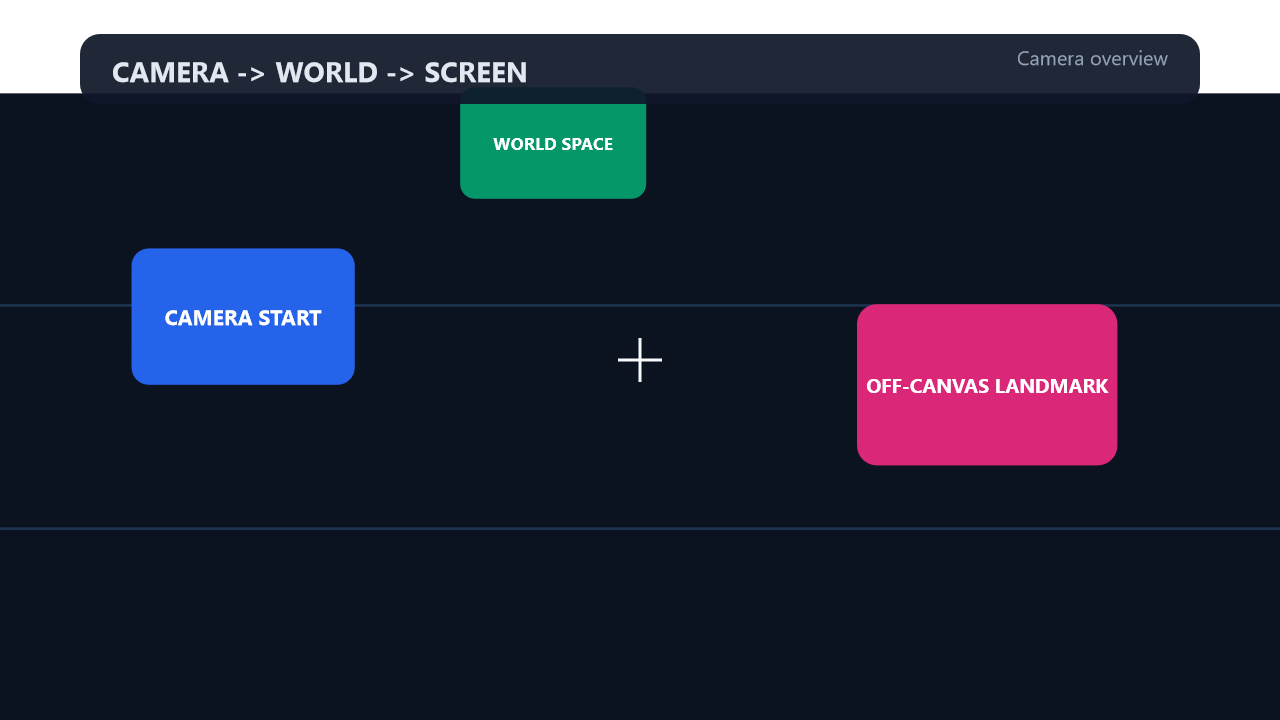
World-space landmarks move under the camera while screen-space HUD chrome stays pinned.
Sample file
- Source:
samples/story/camera-world-demo.story.yaml - Gallery frame:
7.0sfrom the baked12.58ssample, during the overview pass.
Checked-in YAML
Exact complete YAML from the checked-in sample.
yaml
# Story camera, world transform, and screen-space composition demo.
#
# Run with:
#   story preview samples/story/camera-world-demo.story.yaml
#   story export samples/story/camera-world-demo.story.yaml -o camera-world-demo.mp4

story: v1beta1
name: camera-world-demo
canvas: 1280x720
fps: 60

tokens:
  - tween@camera-move: 2s
    easing: 0.16,1,0.3,1
  - spring@world-shake: 0.55,14

script:
  # World space is larger than the logical canvas. Camera movement can reveal
  # content that starts outside the initial viewport.
  - create@world-bg:
      rect: 0,0,2400,1200
      fill: "#0b1220"

  - create@lane-a:
      rect: 0,340,2400,4
      fill: "#1f3554"

  - create@lane-b:
      rect: 0,700,2400,4
      fill: "#1f3554"

  - create@origin-card:
      rect: null
      width: 360
      height: 220
      x: 440
      y: 360
      align: center
      radius: 28
      fill: "#2563eb"

  - create@origin-label:
      text: "CAMERA START"
      fontSize: 34
      fontFamily: "Segoe UI"
      fontWeight: bold
      color: "#ffffff"
      x: 440
      y: 360
      align: center

  - create@east-card:
      rect: null
      width: 420
      height: 260
      x: 1640
      y: 470
      align: center
      radius: 32
      fill: "#db2777"

  - create@east-label:
      text: "OFF-CANVAS LANDMARK"
      fontSize: 32
      fontFamily: "Segoe UI"
      fontWeight: bold
      color: "#ffffff"
      x: 1640
      y: 470
      align: center

  - create@north-card:
      rect: null
      width: 300
      height: 180
      x: 940
      y: 80
      align: center
      radius: 24
      fill: "#059669"

  - create@north-label:
      text: "WORLD SPACE"
      fontSize: 28
      fontFamily: "Segoe UI"
      fontWeight: bold
      color: "#ffffff"
      x: 940
      y: 80
      align: center

  # Screen space is composited after camera/world transforms.
  - create@hud-bg:
      rect: null
      width: 1120
      height: 70
      x: 80
      y: 34
      radius: 20
      fill: "rgba(15,23,42,0.92)"
    space: screen

  - create@hud-title:
      text: "CAMERA -> WORLD -> SCREEN"
      fontSize: 28
      fontFamily: "Segoe UI"
      fontWeight: bold
      color: "#e2e8f0"
      x: 112
      y: 52
    space: screen

  - create@hud-status:
      text: "Default camera - HUD remains fixed"
      fontSize: 20
      fontFamily: "Segoe UI"
      color: "#94a3b8"
      x: 1168
      y: 57
      align: right
    space: screen

  - create@crosshair-h:
      rect: null
      width: 44
      height: 3
      x: 640
      y: 360
      align: center
      fill: "#f8fafc"
    space: screen

  - create@crosshair-v:
      rect: null
      width: 3
      height: 44
      x: 640
      y: 360
      align: center
      fill: "#f8fafc"
    space: screen

  - wait: 0.8s

  # camera.x/y are the world point shown at the logical canvas center.
  # Positive camera rotation turns the viewed world in the opposite direction.
  - set@focus-east:
      camera.x: 1640
      camera.y: 470
      camera.zoom: 1.35
      camera.rotation: 8
      hud-status.text: "Camera pan + zoom + rotation"
    with: $camera-move

  - wait: $focus-east
  - wait: 0.5s

  # The direct world stage is independent from camera state. This creates a
  # whole-world impact without moving the screen-space HUD.
  - set@impact:
      world.x: 22
      world.y: -12
      world.scale: 1.04
      world.rotation: -2.5
      hud-status.text: "Direct world shake"
    with: $world-shake

  - wait: settle

  - set@impact-reset:
      world.x: 0
      world.y: 0
      world.scale: 1
      world.rotation: 0
    with: $world-shake

  - wait: settle
  - wait: 0.4s

  # Pull back to show multiple landmarks. Camera and world transforms compose.
  - set@overview:
      camera.x: 1080
      camera.y: 430
      camera.zoom: 0.62
      camera.rotation: 0
      hud-status.text: "Camera overview"
    with: $camera-move

  - wait: $overview
  - wait: 0.4s

  # world.origin controls the direct world scale/rotation pivot and can animate.
  - set@tilt:
      world.origin: 75%,50%
      world.scale: 0.88
      world.rotation: 5
      hud-status.text: "Animated world origin"
    with:
      tween: 1.4s
      easing: 0.16,1,0.3,1

  - wait: $tilt
  - wait: 0.6s

  - set@reset:
      camera.x: 50%
      camera.y: 50%
      camera.zoom: 1
      world.origin: 50%,50%
      world.scale: 1
      world.rotation: 0
      hud-status.text: "Identity restored"
    with: $camera-move

  - wait: $reset
  - wait: 1s
Mechanics walkthrough
- The world stage is larger than the logical canvas, so
camera.x,camera.y,camera.zoom, andcamera.rotationcan reveal off-canvas landmarks. - HUD nodes opt into
space: screen, which keeps the status bar and crosshair fixed even while the world moves underneath them. - The
world.*transforms are animated separately from the camera to demonstrate whole-stage shake, overview pullback, and pivot changes.
Preview and export
powershell
story preview samples\story\camera-world-demo.story.yaml
story export samples\story\camera-world-demo.story.yaml -o camera-world-demo.mp4
story frame samples\story\camera-world-demo.story.yaml --time 7.0 -o docs\public\images\examples\camera-world-demo.png