

Layer 3D store window
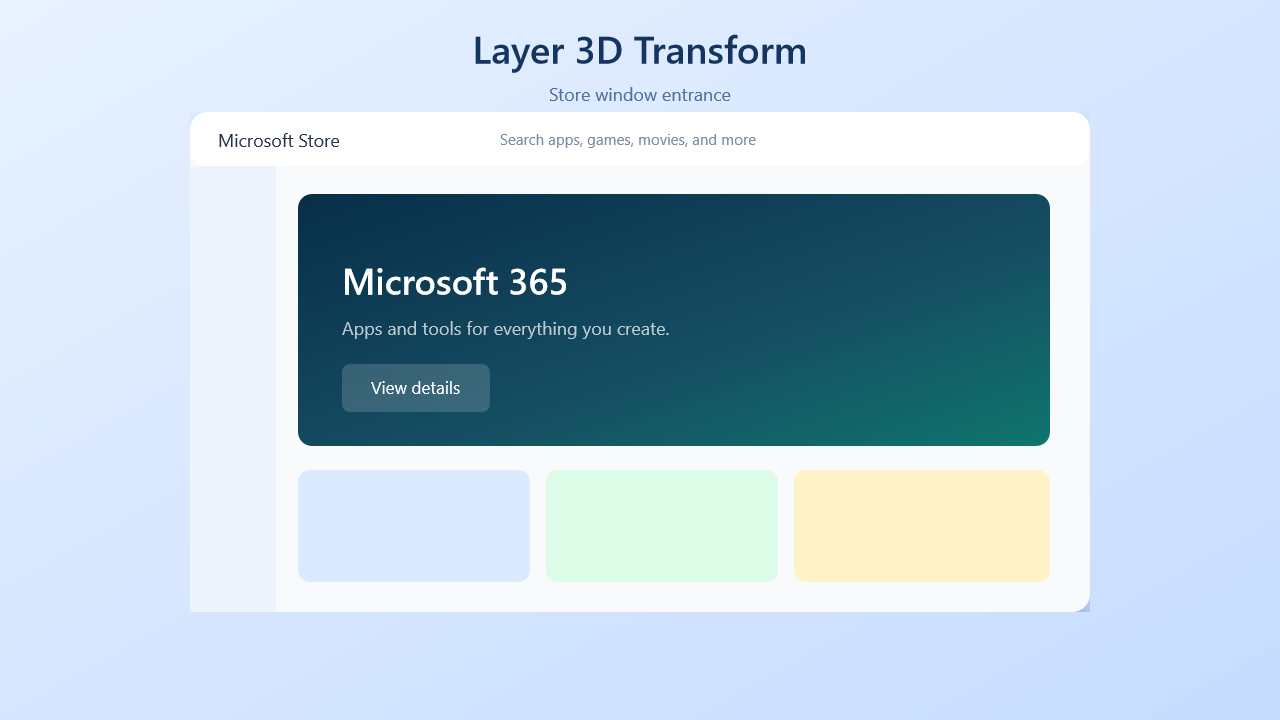
A rigid layer subtree enters in perspective, then the full sample continues into tile and card interactions.
Sample file
- Source:
samples/story/layer-3d-store-window.story.yaml - Gallery frame:
2.0sfrom the baked16.30ssample.
Checked-in YAML
Deterministic excerpt from the checked-in sample: lines 34-145 show the opening store-window entrance used for the gallery frame. The full file continues with tile presses and card flips.
yaml
  # ── Scene 1: Store window perspective entrance ─────────────────────────────
  # Animates opacity, x, y, scale, Z rotation, X/Y rotation, translateZ,
  # and perspective. The complete window subtree remains one rigid plane.
  - create@storePlane:
      layer:
        - rect@window: 0,0,900,500
          fill: "#f8fafc"
          radius: 18
          shadow:
            color: "rgba(31,71,126,0.28)"
            offset: 0,18
            blur: 38

        - rect@titleBar: 0,0,900,54
          fill: "#ffffff"
          radius: 18

        - rect@sidebar: 0,54,86,446
          fill: "#eef4fb"

        - text@storeTitle: "Microsoft Store"
          fontSize: 18
          fontFamily: "Segoe UI"
          color: "#25324a"
          x: 28
          y: 16

        - text@search: "Search apps, games, movies, and more"
          fontSize: 15
          fontFamily: "Segoe UI"
          color: "#7b8ca5"
          x: 310
          y: 17

        - rect@hero: 108,82,752,252
          fill:
            linear: 0%,0%,100%,100%
            stops:
              0: "#082f49"
              0.58: "#164e63"
              1: "#0f766e"
          radius: 14

        - text@heroTitle: "Microsoft 365"
          fontSize: 36
          fontFamily: "Segoe UI"
          fontWeight: semi-bold
          color: "#ffffff"
          x: 152
          y: 144

        - text@heroBody: "Apps and tools for everything you create."
          fontSize: 18
          fontFamily: "Segoe UI"
          color: "rgba(255,255,255,0.72)"
          x: 152
          y: 204

        - rect@button: 152,252,148,48
          fill: "rgba(255,255,255,0.16)"
          radius: 8

        - text@buttonText: "View details"
          fontSize: 17
          fontFamily: "Segoe UI"
          color: "#ffffff"
          x: 181
          y: 264

        - rect@card1: 108,358,232,112
          fill: "#dbeafe"
          radius: 12

        - rect@card2: 356,358,232,112
          fill: "#dcfce7"
          radius: 12

        - rect@card3: 604,358,256,112
          fill: "#fef3c7"
          radius: 12

      x: 245
      y: 150
      opacity: 0.18
      scale: 0.82
      transformOrigin: 50%,50%
      perspectiveOrigin: 50%,42%
      planeBounds: 0,0,900,500
      rotationX: 14
      rotationY: -42
      rotation: -5
      translateZ: -240
      perspective: 700
      backface: visible

  - set@windowIn:
      storePlane.x: 190
      storePlane.y: 112
      storePlane.opacity: 1
      storePlane.scale: 1
      storePlane.rotationX: 0
      storePlane.rotationY: 0
      storePlane.rotation: 0
      storePlane.translateZ: 0
      storePlane.perspective: 1200
    with:
      tween: 1.8s
      easing: 0.16,1,0.3,1

  - wait: $windowIn
  - wait: 0.65s
Mechanics walkthrough
- The
layer:subtree draws a complete storefront UI in local plane coordinates, then Story applies 3D transforms to the plane as one rigid surface. rotationX,rotationY,rotation,translateZ,perspective, andtransformOriginall animate together inset@windowInto flatten the angled entrance into a front-facing window.- The gallery frame at
2.0swas chosen from the hold immediately afterwait: $windowIn, so the screenshot shows the finished store-window composition before later scenes begin.
Preview and export
powershell
story preview samples\story\layer-3d-store-window.story.yaml
story export samples\story\layer-3d-store-window.story.yaml
story frame samples\story\layer-3d-store-window.story.yaml --time 2.0 -o docs\public\images\examples\layer-3d-store-window.png